Does Apple Watch Automatically Turn On Water Lock? Waterproofing Tips
With its sleek design and innovative technology, the Apple Watch has become a popular accessory for fitness enthusiasts and tech-savvy individuals alike. But when it comes to taking your Apple Watch for a dip, you might be wondering – does it automatically turn on water lock? In this article, we’ll explore the ins and outs of the Apple Watch’s water resistance features and provide you with some waterproofing tips to keep your device safe and functioning optimally. So dive in as we uncover the truth about the Apple Watch and water lock!
Contents
- Does Apple Watch Automatically Turn On Water Lock When Submerged?
- Waterproofing Tips for Your Apple Watch When Swimming or Showering
- Understanding the Water Lock Feature on Apple Watch
- How to Manually Enable Water Lock on Your Apple Watch
- Ensuring Your Apple Watch is Properly Sealed for Water Activities
- Precautions to Take When Using Your Apple Watch in Water
- Tips for Cleaning and Drying Your Apple Watch After Water Exposure
- Common Mistakes to Avoid When Waterproofing Your Apple Watch
- The Importance of Regularly Checking Your Apple Watch’s Water Resistance
- Taking Care of Your Apple Watch for Long-term Water Protection
- The Conclusion
Does Apple Watch Automatically Turn On Water Lock When Submerged?
Apple Watch does not automatically turn on Water Lock when submerged in water. Water Lock is a feature that users must manually activate to prevent accidental inputs and damage to the device while underwater. To activate Water Lock on your Apple Watch, simply swipe up on the watch face to access the Control Center, then tap on the water droplet icon. This will lock the screen and disable touch inputs until you turn the Digital Crown to unlock it.
Here are some waterproofing tips to keep your Apple Watch safe while swimming or in water:
- Avoid exposing your Apple Watch to soap, shampoo, lotion, and other chemicals while swimming.
- Rinse your Apple Watch with clean water after swimming in a pool or the ocean to remove any residue.
- Ensure that the Water Lock feature is activated before submerging your Apple Watch in water to prevent any accidental inputs.
- Regularly check and clean the seals and buttons of your Apple Watch to maintain its water resistance.
| Water Resistance Rating: | Apple Watch Series |
|---|---|
| 50 meters | Apple Watch Series 2 and later |
| 5 meters | Apple Watch Series 1 |

Waterproofing Tips for Your Apple Watch When Swimming or Showering
When it comes to keeping your Apple Watch safe while swimming or showering, there are a few waterproofing tips you should keep in mind. One of the most important features to take advantage of is the Water Lock function, which helps prevent water from entering your device. The Apple Watch does not automatically turn on Water Lock when you start swimming or showering, so it’s important to activate it yourself before exposing your watch to water.
To enable Water Lock on your Apple Watch, simply swipe up on the watch face to access the Control Center. From there, tap on the water drop icon that says “Water Lock” to activate the feature. This will lock your screen and disable any taps or swipes until you turn off Water Lock by turning the digital crown. This prevents accidental interactions with your watch while it’s wet.
Another important tip for waterproofing your Apple Watch is to always rinse it with fresh water after swimming in salt water or chlorinated pools. This helps remove any harmful substances that could potentially damage your device over time. Additionally, make sure to dry your watch thoroughly with a soft, lint-free cloth after exposure to water to prevent any moisture buildup inside the device.
By following these waterproofing tips and taking advantage of the Water Lock feature, you can ensure that your Apple Watch stays safe and functional even during your most intense swimming sessions or relaxing showers. With a little care and attention, you can enjoy the convenience of wearing your watch in water without worrying about potential damage.

Understanding the Water Lock Feature on Apple Watch
When it comes to using your Apple Watch near water, it’s important to understand the Water Lock feature. This feature helps prevent accidental taps and swipes while the watch is submerged, protecting it from water damage.
Here are some key points to know about the Water Lock feature:
- Manually enable Water Lock before exposing your Apple Watch to water.
- Water Lock disables the touchscreen to prevent accidental interactions.
- To unlock the watch after water activities, turn the Digital Crown to eject water and unlock the screen.
If you’re wondering whether the Apple Watch automatically turns on water lock when in contact with water, the answer is no. You have to manually enable this feature before exposing the watch to water.

How to Manually Enable Water Lock on Your Apple Watch
To manually enable Water Lock on your Apple Watch, follow these simple steps:
- First, swipe up on your Apple Watch to access the Control Center.
- Find the water droplet icon and tap on it to activate Water Lock mode. This will disable the screen and prevent any accidental taps or swipes while submerged.
- When you’re done with your water activities, simply turn the Digital Crown to eject any water from the device and unlock the screen.
Remember, enabling Water Lock manually can help prevent any unwanted interactions with your Apple Watch while in water. It’s always a good idea to take extra precautions to protect your device, especially when it comes to water exposure.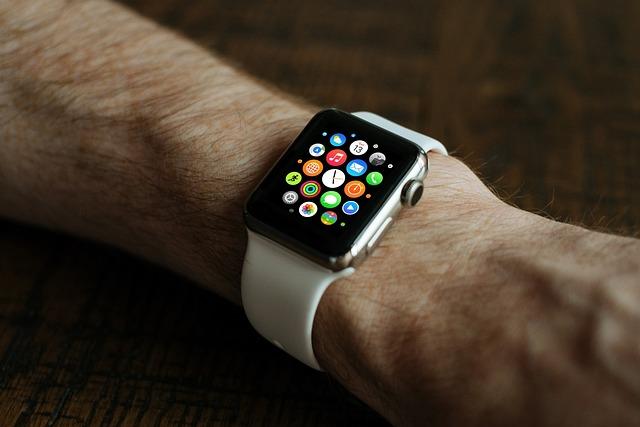
Ensuring Your Apple Watch is Properly Sealed for Water Activities
If you’re planning on taking your Apple Watch for a swim or any water-related activities, it’s important to ensure that it’s properly sealed to prevent water damage. While the Apple Watch is technically water-resistant, there are steps you can take to make sure it’s fully protected.
One feature to take advantage of is the Water Lock function on your Apple Watch. This feature prevents accidental taps and swipes while you’re in water by locking the screen. To activate Water Lock, simply swipe up on the watch face and tap on the water droplet icon. Remember to turn off Water Lock once you’re out of the water to regain full functionality.
Additionally, consider these waterproofing tips for your Apple Watch:
- Make sure the watch band is securely fastened to create a tight seal.
- Rinse your Apple Watch with freshwater after exposure to saltwater or chlorinated water to prevent corrosion.
- Regularly check the seals and gaskets for any signs of wear or damage and replace them if necessary.
| Waterproofing Tips |
|---|
| Keep the watch band securely fastened |
| Rinse with freshwater after exposure to saltwater or chlorine |
| Regularly check seals and gaskets for wear |
By following these simple tips and utilizing the Water Lock feature on your Apple Watch, you can enjoy your water activities without worrying about damaging your device. Stay informed and take proactive measures to keep your Apple Watch in top condition.

Precautions to Take When Using Your Apple Watch in Water
When using your Apple Watch in water, it’s important to take some precautions to avoid any damage or malfunctions. One important feature to be aware of is the Water Lock function, which prevents accidental interactions with the watch’s screen while submerged. However, the Apple Watch does not automatically turn on Water Lock when it detects water. You will need to manually enable this feature to ensure the watch remains safe during water activities.
Here are some waterproofing tips to keep in mind when using your Apple Watch in water:
- Before submerging your Apple Watch, ensure that the Water Lock feature is enabled to prevent any accidental touches on the screen.
- Rinse your Apple Watch with fresh water after swimming in saltwater or chlorine to remove any residue that may cause damage over time.
- Avoid exposing your Apple Watch to high-pressure water, such as from a shower or jet spray, as this can potentially damage the device.
- After water activities, dry your Apple Watch thoroughly with a soft, lint-free cloth to prevent water damage and ensure optimal performance.
| Do | Don’t |
|---|---|
| Enable Water Lock before water activities | Expose your Apple Watch to high-pressure water |
| Rinse your Apple Watch with fresh water after swimming | Wear your Apple Watch in a hot tub or sauna |

Tips for Cleaning and Drying Your Apple Watch After Water Exposure
After exposing your Apple Watch to water, it’s important to clean and dry it properly to prevent any potential damage. Follow these tips to ensure your device stays in top condition:
- Start by removing your Apple Watch from any water source and gently shaking it to remove excess moisture.
- Use a soft, lint-free cloth to wipe down the exterior of the watch, making sure to dry off any water that may have seeped into the crevices.
- Next, place your Apple Watch in a well-ventilated area and let it air dry for at least a few hours. Avoid using heat sources such as hair dryers, as they can damage the internal components.
- For additional protection, consider investing in a waterproof case or band for your Apple Watch to prevent water exposure in the future.
Common Mistakes to Avoid When Waterproofing Your Apple Watch
One common mistake to avoid when waterproofing your Apple Watch is assuming that it will automatically turn on the water lock feature. Unlike some other smartwatches, the Apple Watch does not automatically engage water lock mode when it detects water. You need to manually enable this feature to prevent water from entering the device and potentially causing damage.
Another mistake to avoid is not properly sealing all openings on your Apple Watch before exposing it to water. Make sure that the charging port, speaker, and microphone are securely covered to prevent water from seeping into the device. This will help ensure that your Apple Watch remains waterproof and functions properly even after being submerged in water.
It’s also important to avoid using harsh chemicals or cleaning products on your Apple Watch when waterproofing it. These substances can damage the seals and compromise the water resistance of the device. Stick to using a soft, damp cloth to gently clean your Apple Watch and avoid exposing it to any potentially damaging substances.
Lastly, make sure to regularly check the water resistance of your Apple Watch and reapply any waterproofing treatments as needed. Over time, the seals on your device may wear down, so it’s important to keep an eye on the water resistance and take the necessary steps to maintain it. By avoiding these common mistakes, you can ensure that your Apple Watch remains protected from water damage and continues to function properly.
The Importance of Regularly Checking Your Apple Watch’s Water Resistance
One key aspect of owning an Apple Watch is maintaining its water resistance. Regularly checking your device’s water resistance is crucial to ensure it remains protected against water damage. Not only does this prolong the lifespan of your Apple Watch, but it also provides peace of mind knowing that your device can withstand exposure to water.
To prevent any mishaps, it’s essential to manually enable the Water Lock feature before exposing your Apple Watch to water. This feature blocks the screen from accidental interactions while submerged, preventing any unwanted commands. It’s important to remember that the Water Lock feature does not automatically turn on, so always remember to activate it before coming into contact with water.
In addition to enabling the Water Lock feature, there are additional waterproofing tips you can follow to further protect your Apple Watch. Avoid exposing your device to high-pressure water, such as jets in hot tubs or showers, as this can compromise its water resistance. Additionally, regularly checking the seals and condition of your Apple Watch can help maintain its water resistance over time. By taking these precautions, you can enjoy your device worry-free, whether you’re swimming, showering, or simply caught in the rain.
Taking Care of Your Apple Watch for Long-term Water Protection
One of the key features of the Apple Watch is its water resistance, allowing you to wear it during a range of activities without worrying about water damage. However, it is important to take care of your Apple Watch to ensure its long-term water protection. Here are some tips to help you maintain your Apple Watch’s water resistance:
- **Avoid exposure to harsh chemicals**: Chemicals such as chlorine can compromise the seals of your Apple Watch, leading to potential water damage. Be mindful of where you wear your watch to prevent exposure to harmful substances.
– **Regularly clean your Apple Watch**: Dirt and debris can accumulate around the seals of your watch, affecting its water resistance. Use a soft, lint-free cloth to gently clean your watch, paying attention to the areas around the Digital Crown and side button.
– **Ensure a secure fit**: Make sure that your Apple Watch band is securely fastened to your wrist to prevent water from seeping into the device. Adjust the fit of your band as needed to maintain a snug and secure fit.
By following these simple tips, you can help protect your Apple Watch from water damage and ensure that it continues to function properly for years to come. Remember that while the Apple Watch is water-resistant, it is not waterproof, so it is important to take care when exposing it to water.
The Conclusion
In conclusion, knowing how to manually turn on the water lock feature on your Apple Watch can help prevent water damage and ensure its waterproofing capabilities. Remember, the Apple Watch does not automatically turn on the water lock function, so it’s important to activate it yourself before entering water. By following these waterproofing tips, you can enjoy using your Apple Watch in wet conditions without worrying about potential damage. Stay informed and keep your device safe!
Get our latest guides, news, and insights highlighted in your Google Search & AI Overviews.