Does My Apple Watch Automatically Track My Steps? Fitness Tracking Insights
If you’re a proud owner of an Apple Watch eager to stay on top of your fitness goals, you may be wondering: does my Apple Watch automatically track my steps? In this article, we’ll delve into the sophisticated fitness tracking capabilities of your favorite accessory and provide insights on how it monitors your daily steps effortlessly. Let’s uncover the magic behind this must-have gadget and how it keeps you moving towards a healthier lifestyle.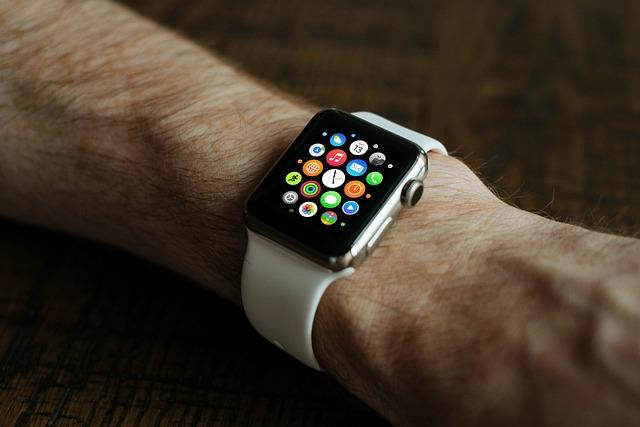
Contents
- Does My Apple Watch Track Steps Automatically?
- Understanding the Accuracy of Apple Watch Fitness Tracking
- How to Ensure Your Apple Watch is Tracking Steps Correctly
- Using Apple Watch to Set Daily Step Goals
- Evaluating the Impact of Different Activities on Step Count
- Tips for Increasing Step Count with Your Apple Watch
- Comparing Apple Watch Step Tracking to Other Fitness Trackers
- Customizing Apple Watch Fitness Features for Personalized Tracking
- Utilizing Apple Watch’s Health App to Analyze Step Data
- In Conclusion
Does My Apple Watch Track Steps Automatically?
Yes, your Apple Watch is equipped with a built-in accelerometer and gyroscope that automatically track your steps throughout the day. This means you can easily keep tabs on how active you’ve been and set goals to improve your overall fitness. The tracker is designed to seamlessly integrate into your daily routine, making it easy to stay on top of your fitness goals without having to manually input data.
With the Apple Watch’s step tracking capabilities, you can easily monitor your progress and stay motivated to reach your activity goals. The data collected is displayed in the Activity app on your iPhone, where you can see your step count, distance traveled, and active calories burned. This information is helpful for tracking your overall activity levels and making adjustments to your fitness routine as needed.
Additionally, the Apple Watch can automatically detect when you start a workout and adjust its tracking accordingly. Whether you’re going for a run, taking a brisk walk, or doing yoga, the watch will accurately track your steps and other fitness metrics to give you a comprehensive view of your daily activity. This makes it easy to stay on top of your fitness goals and make progress towards a healthier lifestyle.
Understanding the Accuracy of Apple Watch Fitness Tracking
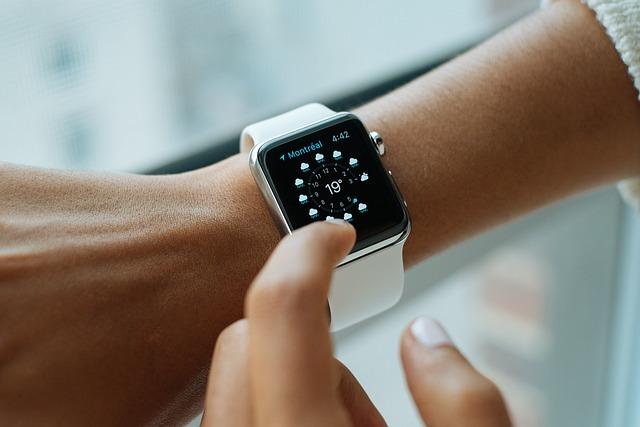
The accuracy of fitness tracking on your Apple Watch can vary depending on a few factors. While the Apple Watch is a sophisticated piece of technology, it is not infallible and may not always provide 100% accurate data. Here are some insights to help you understand the accuracy of your Apple Watch’s fitness tracking:
- Motion Sensors: The Apple Watch uses motion sensors such as an accelerometer and gyroscope to track your movements. These sensors are quite accurate in detecting activities like walking, running, and biking. However, they may not be as precise when it comes to activities like weightlifting or yoga.
- Heart Rate Monitor: The Apple Watch’s heart rate monitor is generally reliable for tracking your heart rate during workouts. It uses photoplethysmography technology to measure your heart rate through your wrist. Keep in mind that factors like tattoos or skin tone could affect the accuracy of the heart rate readings.
- GPS: If your Apple Watch has built-in GPS, it can provide more accurate data for outdoor activities like running or cycling. GPS helps track your distance, pace, and route more precisely compared to relying solely on motion sensors.
| Activity | Apple Watch Accuracy |
|---|---|
| Walking/Running | High Accuracy |
| Weightlifting | Moderate Accuracy |
| Outdoor Cycling | High Accuracy with GPS |

How to Ensure Your Apple Watch is Tracking Steps Correctly
One key thing to keep in mind when using your Apple Watch to track your steps is that it does not automatically track your steps. You need to enable the built-in pedometer feature on your device for it to accurately count your steps throughout the day. Here are some tips to ensure that your Apple Watch is tracking your steps correctly:
– Make sure that your Apple Watch is securely fastened to your wrist. If it slides around or is too loose, it may not be able to accurately track your steps.
– Calibrate your Apple Watch to improve the accuracy of your step tracking. You can do this by walking or running on a treadmill for about 20 minutes at a consistent pace while wearing your device.
– Regularly update your Apple Watch software to ensure that any bugs or issues with the step tracking feature are fixed promptly. Check for software updates in the Settings app on your device.
– If you notice that your Apple Watch is not tracking your steps correctly, try resetting the device and re-enabling the pedometer feature. This can sometimes resolve any tracking issues you may be experiencing.
By following these tips, you can be confident that your Apple Watch is accurately tracking your steps throughout the day, helping you stay on top of your fitness goals.
Using Apple Watch to Set Daily Step Goals
Setting daily step goals on your Apple Watch is a great way to stay motivated and track your progress towards a healthier lifestyle. By default, your Apple Watch automatically tracks your steps throughout the day, but setting specific goals can help you push yourself further and meet your fitness targets.
Here are some insights on using your Apple Watch to set daily step goals:
- Open the Activity app on your Apple Watch to set a daily step goal that works for you.
- Customize your goal based on your current activity level and fitness aspirations.
- Receive notifications and visual cues on your Apple Watch to help you stay on track and reach your step goal.
| Step Goal | Daily Average Steps |
|---|---|
| 5,000 steps | Beginner level |
| 10,000 steps | Intermediate level |
| 15,000 steps | Advanced level |
By using your Apple Watch to set daily step goals, you can track your progress, challenge yourself, and ultimately improve your overall health and well-being. So grab your Apple Watch, lace up your shoes, and start stepping towards a healthier you!

Evaluating the Impact of Different Activities on Step Count
When it comes to tracking your daily step count, the Apple Watch is a popular choice for many fitness enthusiasts. One common question that users often have is whether the Apple Watch automatically tracks their steps. The answer is yes, the Apple Watch does automatically track your steps throughout the day. It uses a built-in accelerometer to measure your movements and calculate the number of steps you take.
However, it’s important to note that the accuracy of step tracking can vary depending on the type of activity you’re doing. Some activities may not be accurately counted as steps by the Apple Watch. To evaluate the impact of different activities on step count, you can compare the data in the Health app on your iPhone. This can give you insights into how different activities affect your step count and help you make adjustments to your fitness routine.
Here are a few examples of activities that may impact your step count:
- Walking: Walking at a steady pace is generally accurately counted as steps by the Apple Watch.
- Running: Running tends to be more accurately tracked by the Apple Watch due to the higher intensity of movement.
- Cycling: Cycling may not be accurately counted as steps by the Apple Watch since the movement is different from walking or running.
| Activity | Impact on Step Count |
|---|---|
| Walking | Accurately counted |
| Running | Highly accurate tracking |
| Cycling | Not accurately counted |

Tips for Increasing Step Count with Your Apple Watch
To increase your step count with your Apple Watch, there are a few tips and tricks you can follow. Firstly, make sure you wear your Apple Watch consistently throughout the day to accurately track your steps. Additionally, try incorporating more walking into your daily routine by taking the stairs instead of the elevator, parking further away from your destination, or going for a walk during your lunch break.
Another helpful tip is to set a daily step goal on your Apple Watch. This can motivate you to stay active and reach your target step count each day. You can easily adjust your step goal in the Activity app on your watch or through the Health app on your iPhone.
Furthermore, consider joining challenges with friends and family who also have Apple Watches. Competing against others can make reaching your step count goals more fun and engaging. Lastly, try different workout modes on your Apple Watch, such as Outdoor Walk or Indoor Walk, to track your steps more accurately during specific activities. By following these tips, you can increase your step count and stay motivated to maintain a healthy and active lifestyle.
Comparing Apple Watch Step Tracking to Other Fitness Trackers
When it comes to tracking your daily steps, the Apple Watch is a popular choice for many fitness enthusiasts. But how does it compare to other fitness trackers on the market? Let’s take a closer look at how the Apple Watch step tracking feature stacks up against the competition.
One of the key advantages of the Apple Watch is that it automatically tracks your steps throughout the day, making it easy to keep tabs on your activity levels without having to manually input data. This can be a huge time-saver for those who lead busy lives and don’t have the time to constantly monitor their progress.
While the Apple Watch is known for its accuracy when it comes to step tracking, some users have reported that it may not be as precise as other dedicated fitness trackers on the market. It’s important to keep in mind that no tracking device is perfect, and there may be some margin of error when it comes to counting steps.
Overall, if you’re looking for a convenient and reliable way to track your daily steps, the Apple Watch is a great choice. Its automatic tracking feature makes it easy to stay on top of your fitness goals, and its sleek design and user-friendly interface make it a popular option for many users.
Customizing Apple Watch Fitness Features for Personalized Tracking
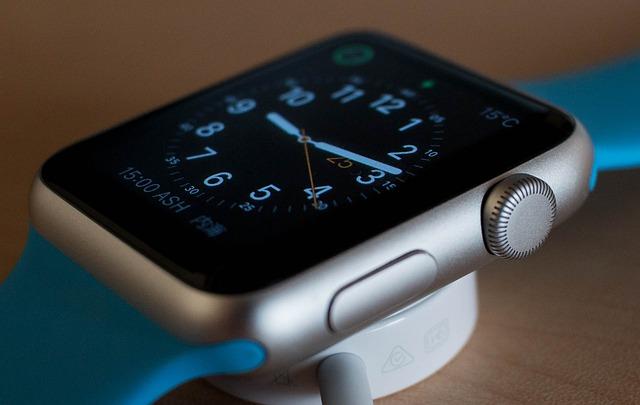
Customizing your Apple Watch fitness features for personalized tracking allows you to make the most out of your workout routine. One common question that many users have is, “Does my Apple Watch automatically track my steps?” The answer is yes, the Apple Watch does automatically track your steps throughout the day, providing you with valuable insights into your daily activity levels.
However, if you want to take your fitness tracking to the next level, you can customize the settings on your Apple Watch to better suit your personal goals. By adjusting the settings, you can track specific metrics that are important to you, such as distance, calories burned, or even specific types of workouts. This level of customization allows you to tailor your fitness tracking experience to best align with your individual needs.
Additionally, you can utilize the Apple Watch’s features, such as the Workout app, to track your exercise sessions in real-time. This feature provides you with detailed metrics during your workout, giving you instant feedback on your performance and helping you stay motivated to reach your fitness goals.
Utilizing Apple Watch’s Health App to Analyze Step Data
The Apple Watch’s Health app is a powerful tool that can help you analyze your step data and stay on top of your fitness goals. By utilizing the tracking capabilities of your Apple Watch, you can gain valuable insights into your daily activity levels and make informed decisions about your health and wellness.
One common question that many Apple Watch users have is whether their device automatically tracks their steps. The answer is yes, your Apple Watch does automatically track your steps throughout the day. This feature is designed to help you keep track of your activity levels and motivate you to stay active.
In addition to tracking your steps, the Health app on your Apple Watch also provides you with detailed information about your daily activity, including distance traveled, calories burned, and more. By reviewing this data regularly, you can gain a better understanding of your fitness habits and make adjustments as needed to meet your goals.
Overall, the Apple Watch’s Health app is a valuable tool for analyzing your step data and staying on track with your fitness goals. By taking advantage of the tracking capabilities of your device, you can make more informed decisions about your health and wellness and work towards a healthier, more active lifestyle.
In Conclusion
In conclusion, your Apple Watch does automatically track your steps using the built-in accelerometer and gyroscope. It offers not only step tracking but also various fitness insights to help you stay on top of your health and wellness goals. By understanding how your Apple Watch tracks your steps, you can make the most out of its features and maximize your fitness tracking experience. Stay active and keep an eye on your progress to reach your fitness goals effectively. Remember, every step counts towards a healthier you.
Get our latest guides, news, and insights highlighted in your Google Search & AI Overviews.